Meeting Room Etiquette and Booking in Shared Offices
Book the right room, protect everyone’s time, include remote participants, and leave a shared meeting space ready for the next group.

Book the right room, protect everyone’s time, include remote participants, and leave a shared meeting space ready for the next group.
Good meeting room etiquette is a set of shared habits and responsibilities. It begins before anyone enters the room. The organizer defines the outcome, counts every participant, chooses a room that fits the activity, records the access and cancellation rules, and sends arrival instructions that a first-time visitor can follow. During the session, the host owns the clock, technology, visitor access, remote participation, privacy and food. At the end, the group stops early enough to remove materials, erase the board, disconnect accounts and hand the room over on time.
The most useful rule is simple: the booked interval includes setup and reset. A one-hour reservation cannot support a one-hour agenda if the team also needs time to connect a laptop and clear the room. Build those tasks into the agenda or buy more time. If the meeting is cancelled, release the reservation immediately, even after the refund deadline. The refund question concerns the organizer’s money. Releasing the room concerns everyone else’s ability to use it.
For hybrid meetings, treat the room and video platform as one combined venue. Test the actual laptop, adapter, display, camera, microphone and meeting link. Assign one person to watch chat and remote raised hands. For confidential work, a closing door is only a starting point. Confirm what can be heard and seen outside, control papers and screens, and know whether recording is permitted.
At 2727 Coworking, the conference room seats eight and is offered as a full day from $300 CAD before taxes, as of October 2026. The standard booking runs from 9:00 to 17:00. It includes a TV with HDMI and a whiteboard, but no video-conference kit. Renters may bring food or catering, and coffee is included. Check live availability at booking.2727coworking.com.
Meeting etiquette once depended mainly on local office culture. A receptionist might hold a paper diary, an assistant might own a department calendar, and most attendees worked in the same building. A shared office separates four roles that used to belong to one employer: the venue controls the room, a booking platform controls the reservation record, the organizer controls the meeting, and participants may arrive from several organizations. That division makes explicit written details essential.
Digital calendars changed the unit of planning. A reservation is now a record with a start, end, organizer, guest list, location and cancellation state. A calendar can prevent two confirmed reservations from occupying the same slot, but it cannot decide whether a six-person room works for four people plus an interpreter, whether the host needs setup time, or whether guests know how to enter. Those are planning decisions.
Hybrid work added a second room with no physical walls. Remote participants enter through a link, experience the meeting through microphones and cameras, and rely on someone in the physical room to notice them. Google Calendar can check room conflicts only up to twelve months ahead, so a distant recurring series still requires review [1]. A room can be physically adequate yet operationally poor if remote participants cannot hear side conversations, see the whiteboard or signal that they want to speak.
Shared offices make time more visible. A held but unused reservation removes inventory from unrelated people. The answer is a short chain of ownership: reserve after defining the need, keep the calendar accurate, start and finish within the purchased interval, and restore the room.
Write one sentence: “At the end of this meeting, we will have decided, reviewed, produced or practised something specific.” This separates a meeting from a general desire to gather and reveals the room requirements.
| Intended outcome | Activity | Room implications |
|---|---|---|
| Make a decision | discussion, evidence review, vote | clear speech and sightlines |
| Present to a client | slides, questions, demonstration | display connection, arrival plan and rehearsal |
| Conduct interviews | private conversation, notes | speech privacy, waiting plan and consistent setup |
| Run training | instruction, exercises, laptop work | table space, power, breaks and circulation |
| Hold a hybrid workshop | discussion and shared digital work | microphones, camera framing and chat monitoring |
| Review confidential material | controlled discussion and documents | visual privacy, acoustic assessment and secure cleanup |
Do not begin with “we need a boardroom.” Boardroom is a layout, not a purpose. A group may fit the chair count but lack space for a facilitator, mobility device, product cases or camera. A capacity number must be tested against the activity and layout.
Count everyone who will occupy the room, including facilitators, interpreters, assistants, technicians, candidates and part-time attendees. Identify equipment that consumes a seat or circulation space. A room advertised for eight should not be treated as an eight-person promise for every layout.
Ask how the stated capacity was calculated. Theatre seating, classroom tables and a boardroom table can produce different usable counts in the same room. Compare the intended arrangement rather than the largest number on a listing.
| Component | What happens |
|---|---|
| Host arrival | entry, room inspection and furniture check |
| Technical setup | display, audio, camera and meeting link |
| Guest arrival | intercom, greeting, coats and seating |
| Working session | agenda, discussion, decisions and breaks |
| Close | decisions, owners and dates confirmed |
| Reset | erase board, remove food, disconnect and inspect |
A practical sixty-minute reservation may hold only forty-five to fifty minutes of agenda. That is a planning example, not a venue rule. If entry begins at the reservation start, shorten the agenda or reserve a longer block. Never assume early setup is complimentary.
Record these booking boundaries in writing:
“Screen included” can mean only a television on a wall. It does not establish that a USB-C laptop connects, that audio plays through it, or that a camera and microphone exist. Write each required device separately.
Keep one record containing the venue confirmation, invoice, policy snapshot, organizer, on-site contact and participant instructions. Copy the confirmed start and end into the calendar. Include the full address and suite, entry procedure, host mobile number, remote link, preparation and a request for accommodations.
Avoid parallel events with different times or addresses. When details change, update the authoritative event and notify participants. A title such as “Workshop, guest arrival 08:50, room access 09:00” distinguishes arrival guidance from paid access without inventing early entry.
When participants work in different regions, specify the intended timezone and verify the converted local times. Google Calendar displays an event in each invitee’s local timezone [3], which helps participants but does not correct an organizer who selected the wrong source timezone.
Availability, construction, transit interruptions, headcount and technology change. Reconfirm facts that would cause failure if wrong. For a client presentation or confidential interview, reconfirm room, access, layout, equipment, accommodations and venue contact.
Send the room resource an actual invitation rather than typing its name only into free text. Microsoft explains that a resource mailbox uses an email address and can accept or decline meeting requests according to conflicts and configured policy [4] [5]. Check its response before treating the reservation as confirmed.
For a consequential meeting, rehearse with the actual host laptop and platform. Open slides, share a window, play audio, join from a second device, and confirm what remote participants hear. Download critical files. Bring only adapters and backups the host knows how to use.
A preflight is not permission to occupy a room outside the booking. Arrange a test or include it in paid time. Without advance access, test elsewhere and leave a realistic setup allowance.
Call the final agenda item early enough to state decisions, assign owners, confirm dates and clear the room. Take every paper and object brought in. Erase boards after capturing permitted content. Log out, disconnect casting, remove files from shared devices and check for chargers.
Reset furniture only as requested. Put waste and dishes where instructed. Report damage or faults promptly so the next group does not discover them without context.
| Venue type | Strength | Limitation | Best fit |
|---|---|---|---|
| Shared-office room | bookable private space with defined capacity | entry, support and equipment vary | interviews, client meetings, small workshops |
| Hotel room | larger formats and event service may be available | service complexity and possible minimum spend | formal sessions and larger groups |
| Cafe | informal and simple | no exclusive occupancy, weak privacy, uncertain seating | short non-sensitive conversation |
| Library room | civic setting and reservable space in some branches | branch-specific eligibility, duration and equipment | study and community sessions |
| Employer office | familiar systems and internal control | fixed location and room scarcity | recurring internal work |
| Fully virtual | no travel and broad access | screen fatigue and weaker physical interaction | distributed updates and short reviews |
Hotel quotations should separate room, food, service, equipment, security and taxes. A coworking room may offer a simpler small-group product, but inclusions still require verification.
Use three filters. Can the venue support the activity? Can it support the people, including accessibility and remote participation? Can the organizer control arrival, privacy, cancellation and technical risks? Compare price only after those gates.
Score each item from 0 to 2. Zero means unsuitable or unanswered, one means workable with mitigation, and two means confirmed fit.
| Criterion | Question |
|---|---|
| Outcome | Does the room support the work and layout? |
| Capacity | Does every person and role fit? |
| Time | Do setup, meeting and reset fit access? |
| Arrival | Can visitors find and enter? |
| Accessibility | Is the required path confirmed? |
| Technology | Is each required connection confirmed? |
| Privacy | Do controls match the subject? |
| Food | Are delivery and cleanup clear? |
| Terms | Are total price, cancellation and overtime known? |
| Recovery | Is there a contact and fallback? |
A zero on a critical requirement disqualifies the room until answered. Do not average away an inaccessible route with good coffee.
Use this planning equation:
Total meeting cost = room and taxes + participant time + travel + food and materials + equipment + disruption risk.
The final term does not require false precision. It prompts the organizer to notice that a failed presentation or delayed panel costs more than the room. Use ranges instead of inventing a probability.
These hypothetical figures are in Canadian dollars and illustrate the method only. They are not market prices. Treat the room figures as assumed tax-inclusive totals for this example; add applicable taxes when comparing actual before-tax quotations.
| Scenario | Room | Participant time | Travel | Food/materials | Total |
|---|---|---|---|---|---|
| Four people, two-hour decision | $120 | $800 | $100 | $40 | $1,060 |
| Eight people, full-day workshop | $350 | $4,800 | $400 | $320 | $5,870 |
| Six people, hybrid client review | $250 | $1,800 | $180 | $60 | $2,290 |
If a more expensive room eliminates an hour of travel for several people, its total may be lower. If a full-day product is the only offer, compare it with another venue’s complete shorter booking, including setup, tax and equipment. Do not divide the day price into an imaginary hourly entitlement.
Treat the cancellation deadline as a decision date and set a reminder before it. Confirm attendance, then keep, reschedule or cancel. After the refund deadline, still release an unused room. A sunk charge does not create value by keeping inventory blocked.
For recurring meetings, pilot the pattern before reserving a long series. Confirm cadence, attendance and room type, then remove holidays, travel dates and known absences.
Give every repeating reservation an explicit frequency and end date. Google Calendar requires those choices and limits a repeating series to 730 occurrences [2]. A technical maximum is not a recommendation to reserve years of scarce room inventory.
Excessive buffer wastes money and inventory. No buffer transfers setup and cleanup into someone else’s time. Estimate tasks instead.
| Task | Planning question |
|---|---|
| Entry | How are guests admitted? |
| Setup | Discussion, HDMI slides or full hybrid call? |
| Breaks | Does the session need food or ventilation breaks? |
| Close | Must decisions be approved before departure? |
| Reset | Are there dishes, furniture or confidential papers? |
Arrival etiquette matters because late entry interrupts the session and may extend the booking.
| Mode | Include in invitation | Verify near the date |
|---|---|---|
| Metro or bus | practical stop, final route, host contact | service and accessible route |
| Bicycle | address and confirmed storage | construction and weather |
| Car | address and official parking links | restrictions and temporary signs |
| Taxi or rideshare | exact entrance and suite | safe drop-off and door access |
| Walking | entrance, landmark and contact | weather and step-free route |
| Remote | link, timezone and support contact | access, captions and dial-in |
Do not equate proximity to a station with a verified accessible journey. For an elevator-dependent trip, STM tells riders to check current elevator status for every station on the route [35]. Charlevoix does not appear on that list as of October 2026. This supports a narrower inference: do not promise step-free metro access via Charlevoix station. Verify any alternative accessible itinerary separately.
The host owns the path from street to seat. If there is no reception, say so. Tell visitors whether to use an intercom, call the host or wait at a named entrance. The host should be reachable and should not begin setup in a way that prevents answering the door.
For several guests, designate a greeter or coordinate arrival. Do not share a member credential or prop open a controlled door. Visitor convenience does not override building security.
Explain whether a waiting area exists. If access begins at 9:00, do not invite entry at 8:45 without confirmation. If someone is late, the meeting still ends on schedule. Send entry instructions and the agenda point in progress instead of stopping the group.

Consultants, accountants, lawyers, recruiters and sales teams need reliable arrival and a setting suited to the subject. Emphasize speech and screen privacy, document cleanup, sightlines and a clear next step. A private booking does not certify legal or professional confidentiality.
Choose for the work rather than status. A compact room may improve discussion. A larger room may be justified for breakout work, prototypes or a facilitator. Adjust or cancel when attendance changes.
Training adds table space, power, materials, breaks and movement. Count the trainer and observers. Test sightlines and build cleanup into the run sheet. See choosing a workshop and training room for deeper layout guidance.
Send candidates exact arrival instructions, avoid exposed waiting, and use a consistent setup. Control names, resumes and notes. See the Montreal interview-room guide.
Design for people outside the room. Assign responsibility for remote voices. The hybrid meeting room guide covers equipment and facilitation in depth.
Confirm recording, identity, private speech conditions and document handling before sensitive discussion. Keep formal minutes separate from a platform transcript unless recording and retention are approved.
Prioritize cost and transit without dropping capacity, accessible arrival and host ownership. If participants do not know one another, explain conduct, photography and recording at the start.
State the planned end. At fifteen minutes remaining, stop opening topics. At five minutes, read decisions and actions. These are recommended controls, not venue rules.
If another booking follows, leave. If the calendar looks empty, extend through the approved channel rather than silently continuing. Cancel as soon as a meeting will not happen. Check the venue's written no-show policy because financial and account consequences vary.
If no confirmation arrives, check the booking account and payment record before inviting guests. Your calendar entry does not prove venue acceptance.
Begin with the reservation record. Check date, timezone, room name and amendments, then contact the venue. Do not settle a conflict by assuming that the earliest timestamp always wins. If your group took the wrong room, leave promptly and apologize briefly.
Google Meet lets a presenter share a tab, a specific window or an entire screen, and recommends sharing a new window or specific tab rather than the meeting window to prevent mirroring [6]. As a privacy precaution, choose the smallest sharing surface that supports the task and close unrelated applications. Assign the meeting host in advance, since host management controls presenting, chat, audio, video and ending the meeting [7]. Confirm caption and language needs, because translated-caption availability depends on the Workspace edition and supported languages [8].
Announce recording and follow the applicable consent settings. Google notes that an administrator may require every participant's explicit consent before recording. Meet recordings include the active speaker and presented content, and can include captions when the recording option is selected [9]. A platform setting does not replace the assessment of applicable legal requirements. Also assign someone to monitor admission: a person without a Google Account can request access, but an organizer or participant must let that person in [10]. Select the correct microphone and speaker during troubleshooting [11], and use the pre-join check to verify that the intended peripherals are connected [12].
Avoid several unmuted laptops in one room. If equipment fails, use a simple fallback the host can execute: one tested device, a directly shared document, telephone audio or an audio-only meeting.
Classify the subject before choosing the room. Québec guidance defines personal information as information that identifies a natural person directly or indirectly [15]. Names, voices, images, attendee lists and recordings can therefore fall within the regime depending on context. The CAI says protection extends from collection through destruction [14] and that necessity takes precedence over consent [17].
| Risk | Control |
|---|---|
| Speech heard outside | test the boundary, lower voices or change rooms |
| Screen visible | reposition it and avoid sensitive previews |
| Papers left | control copies and carry them out |
| Board retained | capture only as approved, then erase |
| Display remembers device | disconnect casting and log out |
| Unapproved recording | state the rule and confirm consent |
| Wrong guest joins | use admission controls and verify identity |
The CAI advises enterprises subject to Québec private-sector privacy law to destroy personal information securely once its purpose is complete, subject to legal retention requirements; lawful anonymization is another option where its conditions are met [21]. This matters for attendee lists, recordings, chats, notes and photographs, not only formal databases. Publish the privacy officer's title and contact details on the organization's website or, if it has none, by another appropriate means, so concerns can reach the person responsible [16].
Recording is a separate decision. Decide whether it is necessary, state the purpose, define retention, notify participants and provide an alternative when policy or law requires one. Get legal advice for regulated or high-risk discussions.
Do not assume a universal cancellation deadline. Save the booking confirmation and the terms shown at purchase, and check the applicable agreement and law when a cancellation is disputed.
Do not casually label every room reservation a commercial lease. If legal classification matters, ask counsel.
When checking identity, collect no more than required. CAI guidance describes the objective as confirming identity or status, not automatically copying identity-document contents [18]. Even viewing personal information on an identity document counts as collection, whether or not it is retained [15]. A visitor list should contain only what the legitimate purpose needs.
If a conferencing, transcription or event vendor handles personal information, document roles and safeguards. Under the service-provider exception described by the CAI, necessary disclosures without consent require a written mandate or contract specifying confidentiality, limited use and non-retention after expiry [19]. Organizations subject to Québec private-sector law must keep a register of all confidentiality incidents involving personal information they hold. If an incident presents a risk of serious injury, promptly notify the CAI and affected people, subject to the applicable exceptions [20]. Follow the organization's incident process when a recording, device, participant list or document is exposed.
The Canadian Centre for Cyber Security advises keeping meeting links and passwords confidential and using a host and waiting room when available [22]. Its remote-work guidance recommends private meetings limited to invited participants and cautions against unsecured public Wi-Fi for sensitive exchanges [23].
Use the confirmed network name, keep devices attended, disable notifications, share one window when practical, sign out of room devices, and report suspected exposure. Do not read passwords aloud, put them on a public sign, or connect unknown removable media.
Ask privately what participants need, then confirm the actual feature. W3C guidance says organizers should ensure both the in-person venue and remote platform are accessible [25]. Federal inclusive-meeting guidance supports asking about accommodations, circulating material, planning breaks and identifying the nearest emergency exits at the start [26].
Confirm the real entrance, step-free route, door and circulation widths, washroom, seating, lighting, background noise, captions, interpretation, service-animal procedure and emergency support. Ask what arrangement enables participation, not for a diagnosis.
Keep routes clear of bags, cables and boxes. CCOHS identifies uncovered cables, obstructed views, poor lighting and uneven flooring as trip risks [30]. Know the exit and follow posted emergency instructions.
For long sessions, plan breaks and water. CNESST recommends alternating tasks and taking short regular breaks [29]. Temporary use does not eliminate discomfort.
Do not promise a room-specific ventilation rate without measurements. Health Canada notes that indoor air quality interacts with building stewardship, ventilation, occupancy, maintenance and cleaning [31]. Report discomfort or an air-quality concern to the venue so it can investigate and apply appropriate controls.
Likewise, “enclosed” does not mean soundproof. CCOHS treats acoustic privacy as a distinct workspace question [32]. Test the real condition before confidential discussion and move the sensitive topic if ordinary speech is intelligible outside.
Ask about allergies and venue restrictions before ordering food. Health Canada recommends providing priority-allergen information for food offered at work [33]. Reduce foodborne-illness risk by cleaning hands, utensils and surfaces and avoiding cross-contamination [34]. Do not promise an allergen-free room merely because one order excludes an ingredient.
Confirm delivery access, alcohol rules, heating appliances, serviceware and waste. Name someone to receive delivery. Coffee included does not imply catering, dishes, milk options or staff cleanup.
Check people and personal items, confidential papers, board content, food, waste, cables, chargers, account sessions and furniture. If the next group waits, finish the reset and continue conversation elsewhere.
The following playbook turns the principles into a repeatable sequence. It is deliberately practical. The exact lead time depends on the meeting and the venue, so the stages are defined by decisions rather than universal calendar deadlines.
Before looking for a room, the organizer should be able to answer five questions. What result justifies bringing people together? Who must participate to reach that result? What information will be discussed? Which participants will join remotely? What would make the session fail?
The last question often exposes the true room requirement. If failure means a client cannot see a demonstration, the display connection and internet fallback are critical. If failure means a candidate cannot enter, arrival and host coverage are critical. If failure means personal information is overheard, acoustic conditions and a lower-risk agenda are critical. A generic amenities list cannot make those choices.
Write a one-paragraph meeting charter. For example: “The six attendees will review three designs and approve one direction. Two people are remote. No personal information will be discussed. We need HDMI display, clear two-way audio, a whiteboard and thirty minutes for setup and reset.” That paragraph is specific enough to screen rooms and short enough to send to a venue.
Decide who has authority to book and spend. The person searching may be an assistant, while the budget owner, facilitator and on-site host are different people. Name each role. If the venue calls about a change, everyone should know who can accept it.
Separate requirements from preferences. A hard requirement is a condition without which the meeting should not proceed. A preference improves the experience but can be traded.
| Category | Hard-requirement example | Preference example |
|---|---|---|
| Capacity | eight people fit in the working layout | extra empty chair |
| Access | confirmed step-free path required by attendee | entrance closest to a cafe |
| Technology | tested HDMI input for presentation | second display |
| Privacy | screen cannot face a public corridor | opaque walls on every side |
| Time | access includes twenty minutes of setup | a longer lunch interval |
| Location | reachable before a fixed client appointment | preferred neighbourhood |
| Commercial | cancellation exposure within approved budget | invoice consolidated monthly |
Ask venues the hard questions first. There is little value in comparing coffee or decor before confirming capacity and access. Treat no answer as unknown, not yes. If an unanswered item is essential, keep searching or change the meeting format.
When comparing photos, remember that images show a moment, not a contract. Furniture, cables and equipment can change. Wide-angle photography can obscure scale. Ask for current confirmation of the features that matter. A visit can resolve layout, arrival and privacy questions, but a tour also reflects one time of day. Noise, building traffic and adjacent activity may differ during the actual booking.
Terms are not merely legal text after the useful information. They define operational facts: when cancellation becomes nonrefundable, whether a card is charged now, whether the organizer may bring food, what overtime costs, and who bears damage or cleaning charges.
Create a short terms record with the booking date, access window, paid amount, tax, cancellation cutoff, rescheduling method and booking reference. Save a copy or screenshot where organizational policy permits. Web pages change, and a future organizer should not have to reconstruct which version applied.
Read the difference between cancellation and rescheduling. A venue may allow one but not the other, or apply the same deadline to both. Check whether the deadline uses local time and whether notice must be made through an account, email or telephone. “We told someone” is weak evidence when the stated process requires an online cancellation.
Do the same for recurring use. One accepted reservation does not automatically approve an open-ended series, evening access or a negotiated price. Obtain a written quote for exceptions and attach it to the authoritative record.
A strong invitation answers what, when, where, how and whom to contact. Use the venue’s complete civic address, suite and exact entrance. Include the local timezone for remote or travelling participants. Distinguish “arrive” from “room opens.” Say whether the building has reception. If the host must admit guests, name that host and provide a mobile contact.
Avoid vague instructions such as “parking nearby,” “close to the metro” or “someone will let you in.” They transfer planning to the visitor and become especially frustrating in rain, winter weather or a service disruption. Link to official route and parking tools, and remind participants to check them near departure.
Keep security information proportionate. Do not put reusable door credentials in a broad invitation. Share one-time or participant-specific access only through the approved method. For a video meeting, do not publish the link and password on a public event page when attendance is controlled.
Ask for accommodation needs in a way that invites a functional answer. “Tell the organizer by the date stated in the invitation if you need an accommodation to participate” is more useful than guessing needs from appearance. Give enough time to verify the arrangement, and provide a private reply channel.
Start the agenda at the moment the meeting can genuinely begin, after access and setup. End it before reset must begin. Place decisions before optional discussion. Assign a facilitator, note-taker and timekeeper when the meeting warrants those roles. In a small meeting, one person can hold several roles, but the responsibilities should remain explicit.
The Government of Canada Language Portal describes an agenda as a summary of what will occur and in what order [27]. Use that order to tell participants what to prepare. For hybrid sessions, W3C guidance recommends putting relevant links and documents in the calendar invitation [28]. Send materials early enough for accessible-format review rather than revealing them only through screen sharing.
Use time boxes as signals, not as excuses to cut off necessary participation. If one section overruns, the facilitator should choose what changes. Do not quietly consume cleanup time. Options include shortening a later topic, assigning follow-up work, scheduling another meeting or making a decision with the evidence already available.
For a hybrid agenda, mark which materials appear on screen, who speaks from the room and when remote participants are invited. A remote participant should not need to interrupt a fast in-room exchange to be heard. Add planned pauses after questions and before decisions.
For interviews, create the same core timing for every candidate. Include welcome, role explanation, structured questions, candidate questions and close. Consistency helps the panel focus on relevant evidence and gives candidates a predictable experience.
Bring only what the session uses. Label boxes and cables. Put the agenda, participant version of the materials and remote link in the invitation or approved repository. Keep an offline copy of critical presentation material, but do not duplicate sensitive data onto personal devices simply for convenience.
Decide whether the whiteboard is a thinking surface or a record. If it is temporary, erase it. If it must become a record, identify the approved capture method and storage location in advance. A photograph on a personal phone may create an unmanaged copy, expose participant names or sync into an unapproved cloud account.
For printed confidential material, know how many copies enter the room and how they leave. Consider collecting them at the end. Do not place sensitive papers in an ordinary recycling bin unless the organization has approved that disposal method.
Food is also material. Match it to the room, agenda and allergies. Individual items may be easier during a working session than shared dishes. Keep liquids away from power strips and presentation equipment. Provide napkins and a cleanup bag when the venue does not.
The host’s first minutes should follow a fixed order. Confirm the correct room and end time. Locate the exit. Inspect obvious hazards. Check the intended accessible route and seating. Confirm the room layout. Then test technology and prepare visitor entry.
Do not spend the entire setup window perfecting slides while guests wait outside. If there is no reception, one person must monitor the intercom or entrance. For a one-person host, keep the phone audible and avoid wearing headphones during the arrival window.
Test privacy at the level the discussion needs. Stand outside the closed door while a colleague speaks at ordinary volume. Look through glass from likely traffic paths. Adjust seating and display direction. This informal test is not a certification, but it can reveal an obvious mismatch before sensitive discussion starts.
If the room is wrong or equipment is missing, contact the venue immediately and document the issue. Decide based on the meeting’s hard requirements. A presentation might proceed with files sent directly to participants. A confidential interview should not simply move to an open lounge.
Start with the outcome, end time and participation method. Introduce remote participants as people in the meeting, not as a screen. State whether recording is active or prohibited. Explain the break plan, food arrangement and emergency information when relevant.
For groups unfamiliar with the space, give one sentence on washrooms and re-entry. For a controlled building, remind guests not to admit unknown people behind them. Avoid a long speech about venue rules. State the few behaviours needed for this session.
If late arrivals are expected, decide who will admit and brief them. The facilitator should not repeatedly restart. A written agenda and named greeter reduce disruption.
Physical rooms favour people who speak quickly, sit near the centre or can read body language. Video platforms introduce another hierarchy based on microphone quality, camera view and chat visibility. The facilitator must actively balance both.
Repeat questions from the room when remote people may not hear them. Name the person invited to speak so audio delay does not create collisions. When someone shares a physical whiteboard, provide a readable digital version or point the camera only after checking that text is legible. Do not assume a distant view is useful.
Watch time and energy. A long meeting needs breaks that actually pause the work. Do not use breaks to continue a decision with only the people who remained in the room. If an informal conversation materially changes the outcome, bring it back to the full group.
Manage side conversations. They are distracting in person and nearly unintelligible online. If two people need to resolve a detail, assign it as follow-up or pause the main discussion deliberately.
The end should convert conversation into a record. Read each decision in plain language. Name one owner and one date for every action. Identify unresolved questions and where they will be answered. Confirm whether another meeting is needed before anyone opens calendars.
Then close content. Do not let “one last thought” restart the meeting during reset. Direct continuing conversation to an appropriate common area only if guest rules permit, or move it to a later call.
Disconnect devices before packing them. End recording and verify its approved storage. Close confidential applications before unplugging the display. Gather papers, wipe board content and inspect chairs, floor and table. Restore the specified layout rather than guessing how the room looked.
Send decisions and actions through the approved channel. A concise record is often more useful than a transcript. Restrict distribution to the people who need it. If the meeting generated personal information, apply the organization’s retention and destruction rules.
Report room faults with useful detail: booking reference, room, time, device, connection attempted and visible error. “The screen did not work” gives the venue little to diagnose. Do not include credentials or sensitive meeting content in a support ticket.
Review whether the room and duration fit. For a recurring meeting, change the next reservation while the evidence is fresh. Release future dates if the series is no longer useful.
Before the scenarios, assign responsibility. A checklist without an owner is only a wish list.
| Responsibility | Booking owner | On-site host | Facilitator | Technical lead | Participants |
|---|---|---|---|---|---|
| approve cost and accept terms | owns | informed | informed | informed | no |
| confirm room and access | owns | verifies | informed | informed | no |
| send invitation and updates | owns | supports | reviews | reviews link | read and respond |
| collect accommodation needs | owns | implements locally | adapts format | adapts platform | communicate needs |
| admit physical visitors | informed | owns | backup | no | follow instructions |
| admit remote participants | informed | backup | owns or delegates | supports | identify themselves |
| test equipment | informed | provides access | verifies content | owns | test personal access |
| manage time and decisions | informed | informed | owns | informed | participate |
| protect documents and recording | owns policy | controls room | announces rules | controls platform | follow rules |
| reset room and report faults | informed | owns | supports | disconnects | collect belongings |
This is a model, not a required corporate structure. In a two-person meeting, one host may own every column. The value lies in making gaps visible. If nobody is assigned to remote admission, a guest can remain in a waiting room while everyone assumes someone else is watching. If nobody owns reset, the final minutes disappear into conversation.
| New fact | Preferred response | What not to assume |
|---|---|---|
| attendance falls materially | resize or release excess space if terms allow | a larger room is automatically better |
| attendance exceeds capacity | move participants online, change rooms or reschedule | one extra chair is harmless |
| a remote participant is added | test audio, link, admission and content sharing | the wall display is a conference kit |
| sensitive topic is added | reassess speech, screen, recording and papers | a closed door is soundproof |
| accommodation is requested | confirm the actual path or feature | an accessibility label answers every need |
| food is added | confirm permission, allergies, delivery and cleanup | coffee service implies catering support |
| meeting moves after hours | obtain a written exception and access plan | member building access includes room access |
| organizer changes | transfer confirmation, terms and authority | calendar ownership transfers the contract |
| date moves | update venue booking before participant calendar | moving the invitation moves the room |
The last distinction prevents a common administrative failure. Editing a personal calendar event may not alter a reservation stored in another booking system. Change the venue record first, wait for confirmation, then update participants.
| Moment | Host action | Evidence of completion |
|---|---|---|
| access begins | enter through approved route and confirm correct room | booking reference matches door and time |
| setup | inspect room, exits, cables, display, network and privacy | hard requirements pass or fallback begins |
| guest arrival | monitor door and remote admission | expected participants are accounted for |
| opening | state outcome, end time, participation and recording status | group understands operating boundary |
| midpoint | test progress against the required output | agenda is adjusted explicitly if needed |
| closing checkpoint | stop opening topics, read decisions and actions | owner and date exist for each action |
| reset | remove materials, data, food and connections | room matches handoff checklist |
| departure | report faults and secure records | venue and organizational follow-up sent |
The run sheet should fit on one screen or page. It is not meeting minutes. Its purpose is to make the operational sequence easy to execute under time pressure.
Room information may appear on a marketing page, marketplace listing, booking checkout, confirmation email and message from staff. When they conflict, do not quietly select the most convenient statement. Ask the venue to resolve the exact point in writing.
Use this practical hierarchy while waiting: the confirmation for the exact reservation is stronger evidence of booked date and time than a generic page; checkout terms accepted for that transaction are stronger evidence of cancellation than an old blog post; a current written venue clarification is stronger than an uncited third-party listing. None of those rules lets an organizer ignore applicable law or a later documented amendment.
Attach the clarification to the booking record. If it changes price or access materially, ask for an updated confirmation. This prevents the on-site host from arriving with only a screenshot of marketing copy while the venue sees a different product.
An absent organizer must transfer more than a calendar event. Give the replacement host the booking reference, exact access procedure, venue contact, paid window, cancellation status, guest list, accommodation plan, technology requirements and authority limits. Tell the venue about the host change if its access process depends on a named person.
Confirm that the replacement can access the video meeting as host or co-host. A link alone may not grant admission or recording controls. Confirm who holds the payment method if an extension or approved extra is needed.
Do not transfer personal information that the replacement does not need. A host may need attendee names and access needs, but not the history behind an accommodation or confidential commercial notes unrelated to running the room.
After the first session, ask four questions. Did everyone enter without support? Did the room and platform allow equal participation? Did the paid window contain setup and reset? Did the room fit the privacy and accessibility needs? Record only actionable answers.
Translate each problem into a change. If entry was confusing, rewrite the invitation. If audio failed at the far end, change equipment or seating. If reset ran late, shorten the agenda or extend the booking. If the room could not protect the subject, choose another room or move that agenda item.
Do not turn the review into a broad rating of the venue when the problem was a planning error, and do not blame planning when a confirmed feature was absent. Separate venue delivery, organizer decisions and participant behaviour. That distinction produces a fair report and a useful next booking.
Check input selection, cable seating and the laptop’s display controls. Try the confirmed backup adapter or cable. If that fails, send the file through the approved channel and let participants view it on their own devices. Do not spend most of the meeting troubleshooting a presentation that can be distributed.
Pause. Confirm the selected microphone, move participants closer, reduce side speech and test again. If room audio remains unusable, have one device carry audio while others stay muted, or switch to a telephone bridge. Record the limitation for future bookings.
Do not exceed the venue’s capacity. Ask for an approved alternative, reduce in-room attendance by moving willing participants online, or reschedule. Do not block aisles or remove accessibility space to fit another chair.
Use the booking contact and documented access procedure. Keep guests informed from outside. Do not follow an unrelated member through a controlled door or ask a stranger to share credentials.
Continue the agenda when food is optional. Assign one person to receive delivery without interrupting the speaker. If food is essential to a long session, move the break rather than allowing repeated door interruptions.
Stop that topic. Lowering voices may not be enough. Move to a confirmed room, defer the sensitive section or change to a secure follow-up. Convenience should not turn an observed privacy weakness into an accepted risk.
Pause and clarify the recording status, purpose, authority and participant understanding. If the conditions are not satisfied, stop the recording and follow organizational policy. Do not assume a platform indicator resolves every consent or retention issue.
Protect the end time. The facilitator should choose which remaining item is essential and assign the rest. Ask the venue about extension only when there is a real need and the booking process allows it. Never make the next group enforce your deadline.
Respond to the functional need promptly and contact the venue. If the current room cannot support participation, consider a verified alternative or remote option. Do not debate whether the request should have arrived earlier in front of the group.
Confirm the clock and booking. If your time remains, state the scheduled end calmly and begin closing as planned. If your time has ended, leave and finish conversation elsewhere. The hallway should not become an argument about etiquette.
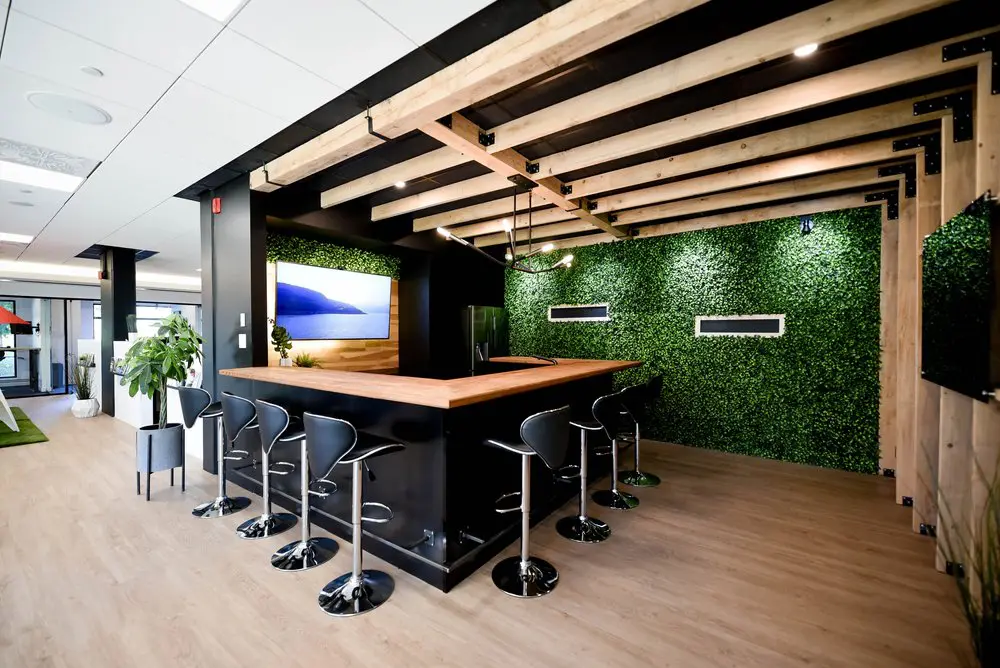
2727 Coworking is at 2727 Rue Saint-Patrick, Suite 109, Montréal, Québec H3K 0A8, in Griffintown near the Lachine Canal, Charlevoix metro and Atwater Market. Its room seats eight. The standard product is a full day from $300 CAD before taxes, as of October 2026, from 9:00 to 17:00. There is no hourly or half-day rate and no multi-day discount. Check live availability at booking.2727coworking.com. GST is 5 percent and QST is 9.975 percent of the before-tax price; the combined calculation rate is 14.975 percent [24]. A $300 CAD before-tax price therefore gives an estimated $344.93 CAD total. Confirm any additional charges. The combined rate must not appear on the sales document.
For bilingual invitations, use a clear room name in each language. The OQLF lists both salle de réunion and salle de conférence among its preferred French terms [36]. Consistent naming helps guests match the invitation to signs and booking records.
The room includes a TV with HDMI, whiteboard and coffee. There is no video-conference kit. Renters may bring food or catering. Access is self-serve from 9:00, with no reception. Visitors use the intercom, and the host lets them in.
Office and desk members may use the room free when available and booked. Included use still requires a confirmed reservation. Private-office and dedicated-desk 24/7 access does not extend the standard room window.
Cancellation or rescheduling is free up to 48 hours before. After that, there is no refund. Evening, weekend and recurring uses are considered on request with a quote.
Book once time, essential participants and purpose are firm. There is no universal number of days. Check live availability and cancellation terms.
Avoid holding rooms you do not expect to use. If temporary holds are supported, record an expiry and release extras promptly.
Include entry, setup, guest arrival, agenda, decisions and reset. Do not make the agenda equal the reservation length unless no setup or cleanup is required.
Add only what the work needs and keep it inside paid time. Confirm early-access and overtime rules.
Count attendees and support roles, then consider layout, equipment, circulation and accessibility.
Operator rules vary. Confirm admission, entry, waiting and host responsibilities.
Send full address and suite, entrance, arrival time, door procedure, host contact, accessibility details and remote link.
No. The venue confirmation or booking-account record is evidence.
Pilot the pattern, then reserve the confirmed cadence, remove holidays and review regularly.
Cancel immediately, even after the refund deadline, so others can use it.
The scheduled end remains unless an extension is approved. Adjust the agenda rather than taking the next group’s time.
Only after extending through the approved process. An empty room is not proof of availability.
Check date, time, timezone and room name, then show the confirmation calmly and contact the venue.
Cancel through the official channel, notify participants and keep the confirmation. Set a reminder before the refund deadline.
A confirmed reservation nobody uses or cancels. Financial treatment depends on written terms.
Policies differ. Read the exact plan instead of assuming credits, payment or unlimited use.
Often, but not everywhere. Confirm account, payment, entry and common-area rules.
All models exist. Compare products actually offered, not an imagined hourly rate.
Beforehand when a test is offered, or inside the reservation before guests arrive. Use the actual laptop, platform and connections.
Assign a chat monitor, repeat missed comments, share digital content and pause for remote voices.
Confirm venue rules, policy, necessity, notice or consent, security and retention first.
Control copies, prevent screen exposure, collect every page, erase boards and use an approved disposal process.
Ask about the actual entrance, route, doors, washroom, seating, acoustics, captions and emergency procedure based on participant needs.
Discuss the required accommodation and access procedure in advance. Do not treat a general pet policy as the answer.
Only if permitted. Confirm delivery, allergies, alcohol, waste and cleanup.
Remove your food, waste, documents and equipment, erase the board and restore the agreed layout. Confirm any paid cleaning.
Yes, unless explicitly instructed otherwise. Capture content only through an approved process, then check for faint text.
Use the venue’s lost-property process. Do not inspect papers or devices beyond what staff request.
Send the exact entrance and current official links. Recheck service and restrictions. Never promise unconfirmed parking.
From $300 CAD before taxes for 9:00 to 17:00, as of October 2026. Check live availability.
No. The standard offer is a full day, with no multi-day discount.
Eight. Confirm practical fit when equipment, circulation or accommodations need extra space.
A TV with HDMI and whiteboard. There is no video-conference kit.
Coffee is included. Bring your own food or catering and clean up what you bring.
There is no reception. Visitors use the intercom and the host admits them. Standard access begins at 9:00.
Free cancellation or rescheduling up to 48 hours before, then no refund.
Those bookings are possible on request with a quote.
Office and desk members book it free as available. Availability is not guaranteed. Private-office and dedicated-desk 24/7 access does not extend the room booking.
Use the questions to ask before renting a coworking office as a broader due-diligence checklist. For arrival planning, see the Griffintown parking guide. For sensitive discussions, continue with the Québec privacy guide for confidential coworking work. The membership cancellation and business-address guide explains a different product boundary and should not be treated as meeting-room terms.
Optional background articles cover hot desking and flexible workspace, coworking pricing in the United States and Canada in 2025, and workspace design, acoustics and ergonomics. These older articles provide context only. They do not set current 2727 prices, room capacity or booking policy.
A shared meeting room works when the organizer treats it as a complete service interval rather than a door and table. Define the outcome, choose for the activity, document the commercial and access boundary, include every participant, and reserve enough time to return the room ready.
The best etiquette is visible in the handoff. The previous group leaves no confidential trace, technical surprise, food or overtime. The next group enters on schedule. A few deliberate habits protect time, privacy, accessibility and trust across organizations.
[1] [2] [3] [4] [5] [6] [7] [8] [9] [10] [11] [12] [14] [15] [16] [17] [18] [19] [20] [21] [22] [23] [24] [25] [26] [27] [28] [29] [30] [31] [32] [33] [34] [35] [36]